intake · brief · team

Client fills.
Lawyer arrives
prepared.

Captio turns the first client contact into a structured process that ends with an AI-generated summary ready for the lawyer — before the first call.

From $79 / month · Per firm, not per user

The problems most firms carry without fixing

These aren't failures of the lawyers. They're failures of the process. Captio puts the process in order.

Intake is improvised

There's no standard process for the first consultation. Every lawyer handles it differently and information arrives incomplete — in formats only they understand. The first client meeting becomes data collection instead of strategy.

Cases are scattered everywhere

Emails, handwritten notes, WhatsApp threads, files in three different folders. Without a central case file, delegating means whoever takes over starts from zero — not knowing what was promised, what's missing, or what's already done.

The team works out of sync

Two lawyers ask the client the same questions. Case updates travel by WhatsApp or don't travel at all. Without shared real-time visibility, the team can't coordinate — only react.

Deadlines are tracked manually

Someone has to log into the court system, check for updates, and alert the lawyer. One missed notification can lose the case. A missed deadline through oversight creates liability — and there's no process to prevent it.

Firm management operates blind

How many active cases are there? Which ones are stalled? What is each lawyer working on this week? Without a dashboard, firm management is reactive — problems surface only when it's too late to act.

Information gets lost between apps

Strategy notes live in a separate doc. Research sits in a bookmark. Call notes are somewhere else entirely. Nothing reaches the case file where it belongs — and when you need it, nobody knows where it is.

Your entire firm, managed in one place

Captio connects intake, case files, your team, and your clients — without switching between apps or losing context.

AI Intake

The client fills the form from their device and AI generates a structured 10-section brief in seconds. Five ways to start a case: client link, manual entry, import from document, guided interview, or free write — whichever fits the situation.

The complete case file

Each case has its own operational timeline, notes notebook, related documents, legal research from Mexico's SCJN, and federal court monitoring. Every thread of the case in one place — visible to the entire team in real time, in the whole world.

Team in sync

Real-time notification board, task manager linked to cases, and four distinct roles — firm admin, lawyer, and assistant. Every team member sees exactly what they need. No update gets lost between a call and the office.

Firm overview

Dashboard with key firm metrics, client directory linked to their cases, and a full team activity log. Everything you need to run the firm — without opening a spreadsheet.

Everything the firm needs

From the first contact to case notes — in one place.

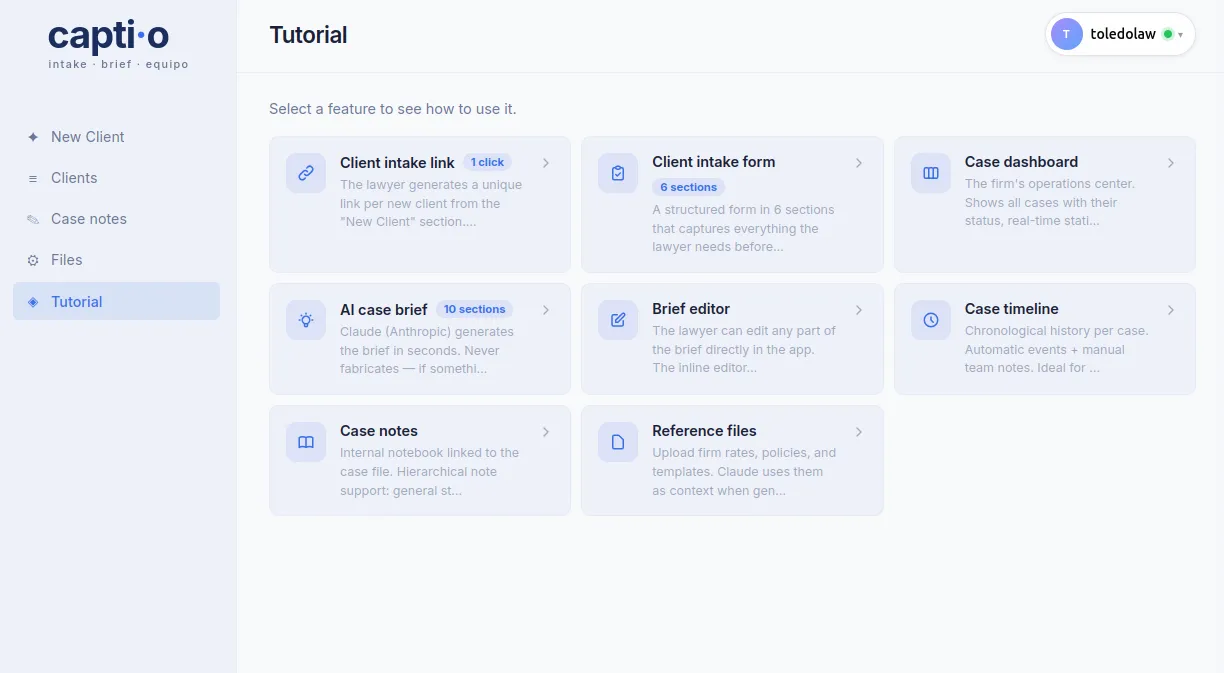
Create a case — 5 ways

Client link, manual form, import from a document, interview the client section by section, or write freely. The case reaches the lawyer's dashboard regardless of the method.

6-section intake form

Captures everything relevant: facts, goals, documents, parties, and conflict of interest. With contextual guidance in each field.

AI-generated brief

Claude (Anthropic) generates the brief in seconds. 10 sections. Faithful to the answers — never fabricates.

Case timeline

Operational case log: first consultation, document collection, filings submitted, court notifications, hearings. The entire team sees the history in real time.

Case notes

Notebook linked to the case file. Supports hierarchical notes for strategy, hearings, and follow-up.

Notification board

Internal firm communication channel. Post notices from a case, brief, note, or timeline. The entire team sees it in real time.

Client directory

Complete profile for each client with their linked cases. From the case file you assign the client in one click; from the profile you navigate directly to any of their cases.

Tasks

Firm task board. Assign, prioritize, and track pending items linked to cases or team members.

Legal Research (SCJN)

Search for tesis and jurisprudencias from Mexico's Semanario Judicial de la Federación directly from the case file. Captio extracts keywords from the brief and shows the 5 most relevant results.

Judicial case monitoring

Register cases before Mexico's federal judiciary and detect changes automatically. AI reads the latest acuerdo and extracts hearings, procedural deadlines, and terms — with the action required from the lawyer.

Demo Cases

Explore Captio with three complete case files — generated brief, timeline, linked notes, and related docs — without needing real clients. Ideal for getting to know the product before you start.
What makes Captio different

Not a generic summary. A structured file built for lawyers.

The form is for the client, not the lawyer

The lawyer fills nothing. The client fills the form on their device, in their language, at their pace.

The brief speaks the lawyer's language

Not a generic summary. Follows the structure of a legal file: conflict of interest, key risks, internal legal considerations.

Faithful to the answers — never fabricates

AI never fills in what it doesn't know. If information is missing, it marks it clearly. The lawyer always knows what they have and what's lacking.

Privacy by design

Each firm's data is isolated. Captio doesn't share data between firms or use it to train AI models.

Three plans. No surprises.

Per firm, not per user.

Solo

1–3 users

$79 / mo
Most popular

Firm

Up to 15 users

$179 / mo

Agency

Up to 30 users

$279 / mo
See full plans and pricing

Frequently asked questions

Does the client need to create an account?
No. The client only needs the link. No registration, no password, no app to download. They open the link in any browser and that's it.
What language is the brief generated in?
In the same language the form was filled out in. If the client filled it in English, the brief is in English.
Can I edit the brief after it's generated?
Yes. The inline editor lets you modify any part of the text, highlight in 5 colors, and save changes. You can also download the brief as HTML.
Is my data secure?
Yes. Each firm's data is isolated. Captio doesn't share data between firms or use it to train AI models.

First call without surprises

Everything you need to know before meeting the client — ready before the phone rings.

Request access — from $79 / month

Demo required · No card · Up to 30 users